Online list
Online lists are the most advanced lists allowing you to load the lists from various online sources. You will find certain examples of usage covered, the rest depends on the customer needs.
General settings
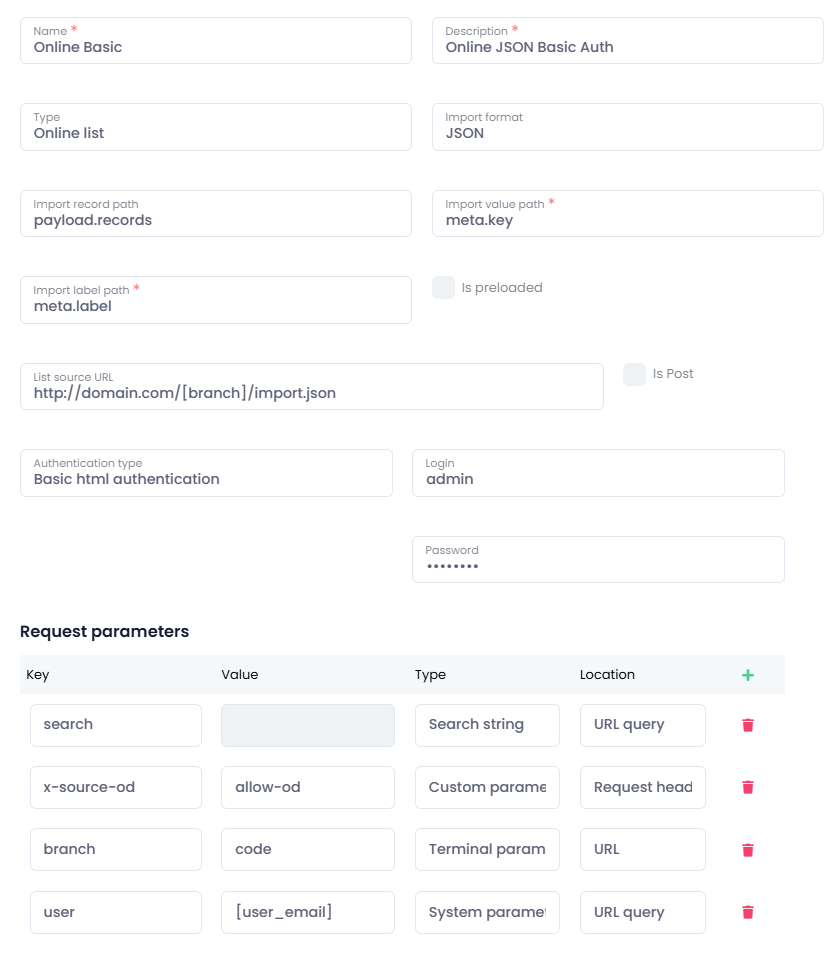
Name - name of the advanced list
Description - description of the advanced list
Type - Online list
Import format - type of the file - JSON
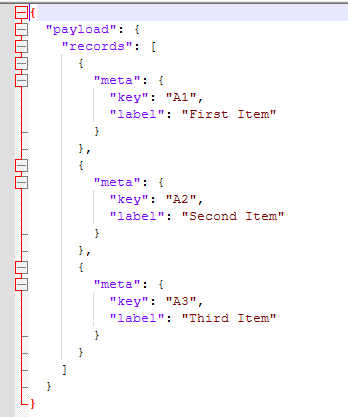
Import record path - path to specific items in JSON structure
Import value path - JSON item name from which the final value will be read
Import label path - JSON item name from which the displayed label will be read
Is preloaded - this option means whether you will see all the items in the list directly or if you will have to use search
List source URL - URL where we can access the list
Is Post - whether the request is made with POST method or not
Authentication type
- None
- Basic html authentication
- Login - login of the user with access to the specific site with list
- Password - user's password
- From workflow - ONS - authentication used from flow that has ONS destination selected
- From workflow - SharePoint - authentication used from flow that has SharePoint destination selected
- Site path - specific SharePoint site where list is located, leave blank to use the site specified in flow
- List name - name of the SharePoint list
- OAuth 2.0
- Authorization endpoint URL - URL that points to authorization page
- Token endpoint URL - URL that returns the token
- Client ID - ID of the created app
- Client secret - client secret of the created app
- Scopes - specified scopes space separated, eg. users.read.ALL
Request parameters
- Key - name of the parameter
- Value - request parameter value
- Type
- Search string - parameter that will be used to search through the list
- System parameter - can be any system parameter, like timestamp, user_name, user_email etc.
- Custom parameter - can be any other type of parameter or a static value
- Terminal parameter - parameter that user enters on the MFP panel or via Workplace
- Location
- URL query - request parameter is passed over in the URL query
- Request header - parameter is passed over to destination via request header
- URL - request parameter is used in the URL itself, or as a part of the query
Redirect URI that you need: https://[datacentre_shortcut, eg. eu, uk, us].optimidoc.cloud/AdvancedLists/OAuthCallback
Example: https://eu.optimidoc.cloud/AdvancedLists/OAuthCallback
JSON Online list using basic authentication
JSON structure for this example is as follows: