Device operations
The Device Operations section provides detailed logs of all printing, scanning, and copying activities performed on devices within a selected date range. It helps track usage patterns, monitor device performance, and analyze operational efficiency.
Filters
Located at the top of the section, filters allow customization of the displayed data:
- Date Range: Select the start and end dates for the report.
- User: Filter operations by specific users.
- Department: Narrow down results to a particular department.
- Device: Choose specific devices to view their activity.
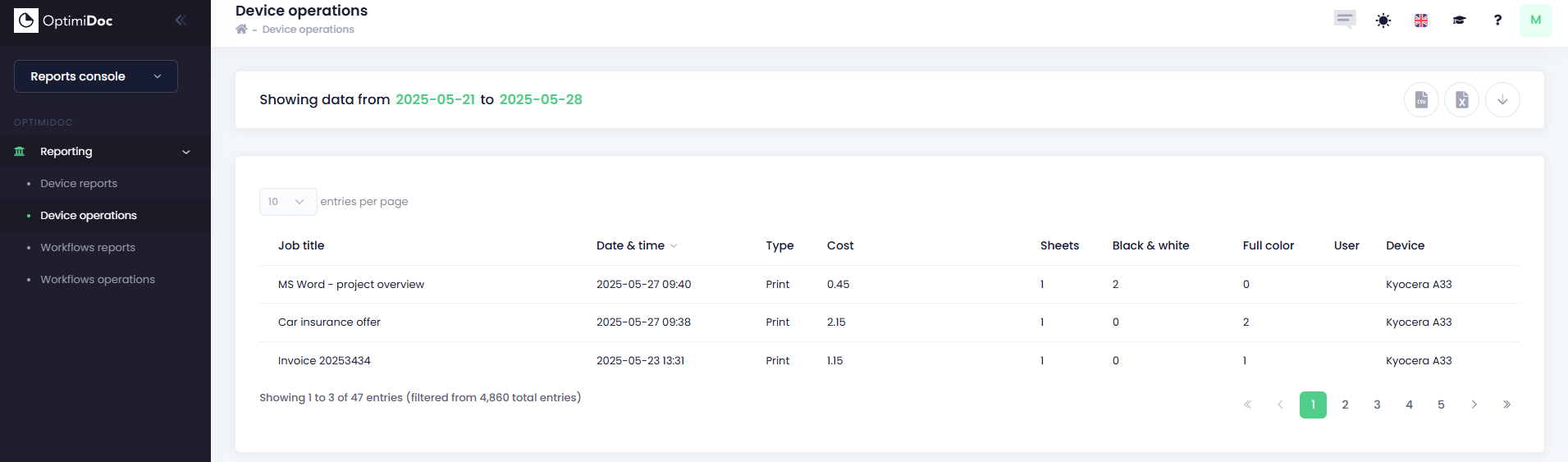
Operations Table Fields
Each row represents a single operation performed on a device. The table includes the following fields:
- Job Title: The name or identifier of the job (e.g., scan job, print job).
- Date & Time: Timestamp indicating when the operation occurred.
- Type: The type of operation (e.g., Print, Scan, Copy).
- Cost: The cost associated with the operation (if tracked).
- Sheets: Number of physical sheets used for the job.
- Black & White: Number of black & white pages processed.
- Full Color: Number of color pages processed.
- User: The user who initiated the operation.
- Device: The device on which the operation was performed.