
To successfully install the OptimiDoc Cloud cloud application, the following prerequisites must be met:
-
The latest Fujifilm firmware must be installed on the device.
-
The device must have connectivity to the selected OptimiDoc Cloud data centre.
-
The tenant must be enabled in OptimiDoc Cloud.
-
It is recommended that the device is kept clean. This means that if any software was previously installed or advanced configurations were set up (such as a proxy), it is wiser to factory reset the device.
-
Once you have completed the steps mentioned above, you need to prepare the device itself:
-
Open the device web interface.
-
Log in to the device as an administrator.
-
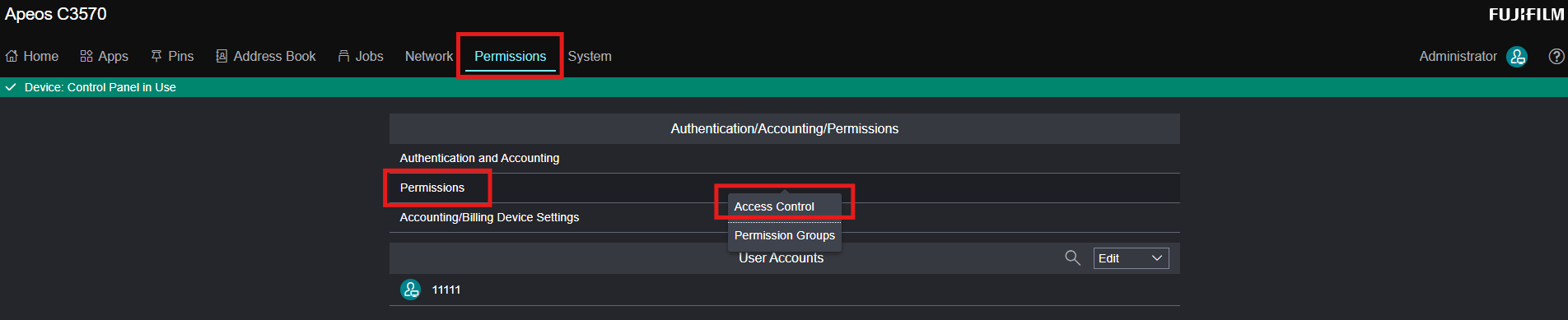
Navigate to Permissions > Permissions > Access Control.
-
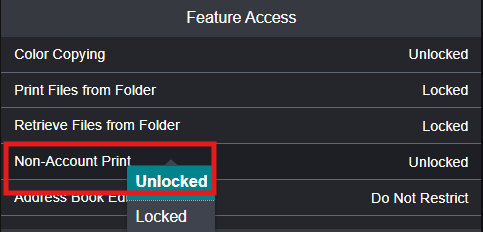
In the Feature Access select Non-Account Print and choose “Unlocked” option.
-
Click Save.